
Is RIS the same as PACS?
Summarize this article with:



According to you, the radiology workflow concludes when the final delivery of the report is done. But do you know that behind the scenes, there lie 2 robust systems that handle the workflow from exam order to report delivery.
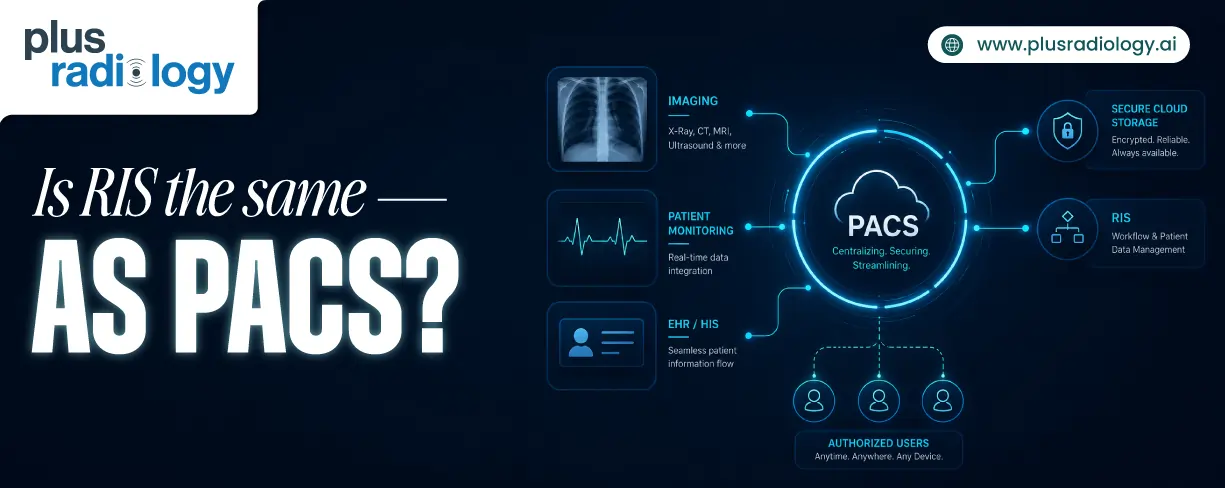
These systems are recognized generally by the Radiology Information System (RIS) and Picture Archiving and Communication System (PACS).
Medical imaging software usually requires RIS and PACS integration. Using them alone will unnecessarily increase your workload. Because they are used in conjunction, they are often confused.
This guide will help you understand the key differences between RIS and PACS. RIS vs PACS comparison will highlight the underlying unique functions they perform.
What is RIS?
The Radiology Information System is a software responsible for carrying out patient data management and administrative tasks throughout the imaging workflow.
Create comprehensive discharge summaries in minutes with intelligent automation
It is generally referred to as the central nervous system of the radiology ecosystem. RIS software ensures smooth administration with proper data flow from the moment an examination is ordered to the report is delivered and billed.
Key functionality:
-
Order management: RIS receives, records, and tracks the order from the referring physicians to final billing.
-
Patient registration: As the examination order is received, RIS creates a new record of the patient if not exist in the database.
-
Appointment scheduling: Looking at patient convenience and availability of modality and technologists, schedule a particular slot.
-
Radiology reporting and delivery: RIS provides many tools to automate the generation of reports. Additionally, it shares the approved reports with physicians and patients.
-
Billing: RIS verifies the procedure codes and, based on that, calculates the charges. It also automates insurance claims and can track payment status.
What is PACS?
Picture Archiving and Communication System is another fundamental component of radiology that manages imaging data. It is used to store, access, share, and view the medical imaging records.
PACS software is known as the digital heart because it handles the crucial data of imaging workflow – the medical images. PACS eliminates the physical hard copy films used to capture the images of X-rays, MRIs, CTs, etc.
Key functionality:
-
Image storage: PACS allows to store images generated from different modalities digitally in a centralized platform.
-
Image retrieval: You can instantly access the required image through the patient details, modalities, date, etc.
-
Image viewing: PACS provides multiple functionalities to view images to enhance the accuracy of interpretation.
-
Image sharing: PACS allows sharing the images with different departments, clinics, and radiologists by ensuring strong security.
-
DICOM compatibility: PACS supports DICOM imaging. Due to this, there creates no issue of invalid imaging format during the exchange of images.
Access real-time answers and workflow guidance with conversational AI support
Is RIS the Same as PACS?
The answer is no. Despite the fact that both are used collectively, they are still different entities. RIS and PACS both required each other's support to transform the imaging lifecycle from siloed, paper-based to a centralized, digital process.
Because RIS and PACS continuously exchange data between themselves, they are paired up and are fitted together. This allows seamless interoperability within diagnostic imaging software.
But in the past, imaging facilities have used RIS and PACS as standalone entities. Due to this, they have to manage the data separately in both systems, which results in a fragmented workflow.
RIS vs. PACS: Key Differences
| Area of comparison | RIS (Radiology Information System) | PACS (Picture Archiving and Communication System) |
|---|---|---|
| What it does | Manages imaging workflow and administrative tasks | Handles image storing, displaying, retrieving, and sharing |
| Protocol | Uses HL7 standard | Uses DICOM standard |
| Key tasks | Order logging, patient registration, appointment scheduling, generating & sharing reports | Storing images, displaying high-resolution images, and image sharing |
| Data type | RIS works with text and numeric types of data | PACS work with digital images |
| Integrates with | RIS integrates with EHR, HIS, and PACS | PACS integrates with RIS and imaging modalities |
| Users | Admin, technologists, radiologists, physicians, patient | Physicians, radiologists |
| Storage requirement | RIS requires low to minimal storage | PACS requires high storage capacity |
| Hardware requirement | Desktops, LAN, servers | Imaging modalities, advanced workstations |
Save time and improve productivity with software tailored for solo radiology practices
How RIS and PACS Work Together
To find what role RIS and PACS perform that makes them unique from each other, you need to visualize the entire imaging lifecycle. Let's begin with that:
-
1. Imaging order is created (RIS): Physician orders a scan. RIS receives the order. It logs all the details related to the scan. Also tracks the status of the order.
-
2. Patient registration and appointment scheduling (RIS): RIS logs the patient details. Then assigns the slot to the patient after checking the availability of the modality.
-
3. Image acquisition (Imaging Modality + RIS): Based on the appointment, the patient goes through a scan. The modality pulls patient and scan details from RIS and links them to the generated images.
-
4. Images are stored in PACS: The modality transfers images to PACS. PACS stores the images in DICOM format.
-
5. Radiologist reviews the images (PACS): The radiologist can view the images in PACS. PACS provides multiple functionalities to adjust the viewing according to the radiologist.
-
6. Diagnostic report is created (RIS): The radiologist now generates a report in RIS using the tools provided by it.
-
7. Report and Images Are Delivered (RIS): RIS then distributed the finalized report to the physician and patient. RIS links the report with the intended patient detail.
-
8. Billing (RIS): RIS then automates the generation of bills and insurance claims. It also tracks the payment status.
Final Thoughts: RIS and PACS Explained
Understanding RIS vs PACS is not about which one is more important, but about how both contribute to the imaging. Before the discovery of RIS and PACS in the radiology workflow, imaging centers had to face many critical bottlenecks.
But when RIS and PACS were introduced, people got confused about their usability. Still, some believe that both serve the same functionalities and are identical in nature.
This can lead to incorrect software purchasing, reduced operational efficiency, and increased administrative work.
To avoid these bottlenecks, you should be aware that RIS and PACS perform unique roles. So you will get to know that, though they carry out different functions, they are dependent on each other.
FAQs
Yes, definitely. PACS can be used as a standalone entity, but for managing only imaging data. If you are looking for software that carries out the entire imaging process from examination order to report delivery & billing, then you need RIS and PACS both.
No, RIS is not meant for storing medical images. It can carry out functions such as order management, appointment scheduling, patient logging, report generation & distribution, and billing.
To manage the complete imaging workflow, improve patient satisfaction, enhance operational efficiency, and boost revenue cycle, hospitals need both RIS and PACS.
These are communication protocols that help RIS and PACS to exchange data between them or to another platform.
DICOM (Digital Imaging and Communications in Medicine): PACS uses this protocol to store, retrieve, display, or share the imaging records.
HL7 (Health Level Seven): RIS uses this protocol to share text-based records to any system in radiology software or to an external platform.

Recent Posts
Is RIS the same as PACS?
June 29, 2026

HIPAA Compliance Checklist for Imaging Centers
June 23, 2026